Loading latest posts

Jerywin Bayawan
Public
PortfolioPublic post
How I Registered My Business With BIR to Get PayMongo Approved
#PayMongo#BIR Registration#Philippines#Business Registration#Payment Integration#Developer Guide
When I first started working with PayMongo, I thought the main challenge would be the integration itself. Creating payment flows, handling webhooks, and connecting the API were the parts I expected to spend most of my time on.
But before using payments in production, there was another side I had to deal with: getting the business properly registered and preparing it for verification.
If you're a Filipino developer, freelancer, or small business owner building a SaaS, online store, booking platform, or another application that accepts payments, this is the process I learned along the way.
Important: This is based on my experience and is meant as a practical guide, not tax or legal advice. BIR and PayMongo requirements can change, so always check their current official requirements before submitting anything.
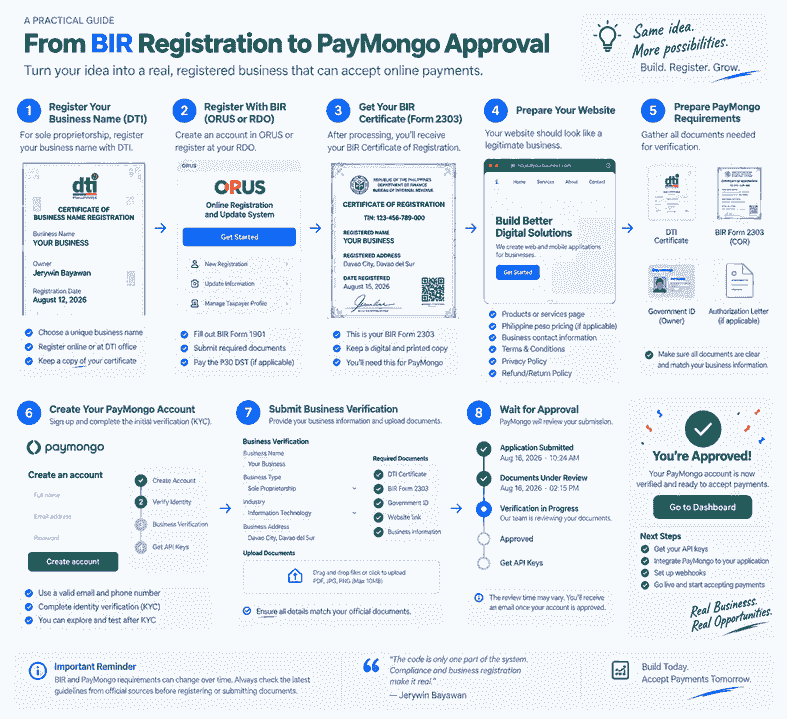
1. Start With Your Business Registration
Before worrying about PayMongo, I first needed the business itself to have a proper legal identity.
For a sole proprietorship, this usually means registering the business name with the Department of Trade and Industry (DTI). Corporations and partnerships generally go through the SEC instead.
One thing worth paying attention to here is consistency. Your registered business name, owner's name, address, and other details will eventually appear across multiple documents.
Keeping those details consistent early can save you from unnecessary verification problems later.
2. Register the Business With BIR
After establishing the business, the next major step was BIR registration.
BIR provides online registration services through the Online Registration and Update System (ORUS), although the exact registration process can depend on your taxpayer and business situation.
At this stage, don't rely entirely on an old YouTube video or blog tutorial. Government procedures and documentary requirements can change.
I found it much safer to treat tutorials as a guide and then compare them against the current requirements provided by BIR.
3. Get the BIR Certificate of Registration
One of the most important documents for my PayMongo preparation was the BIR Certificate of Registration, commonly known as Form 2303.
This document essentially confirms that the business is registered with the BIR and contains important taxpayer and registration information.
For me, getting the COR was an important milestone because I wasn't just preparing a software project anymore. I was preparing an actual registered business that could go through payment-provider verification.
4. Prepare the PayMongo Documents
Once the registration documents were ready, I could focus on PayMongo's business verification requirements.
For a Philippine sole proprietorship, documents you may need include:
- DTI Certificate of Business Name Registration
- Valid government-issued ID of the registered owner
- BIR Certificate of Registration (Form 2303)
The requirements can be different for corporations, partnerships, and other business structures, so make sure you're following the checklist that applies to your actual registration type.
5. Don't Forget Your Website
This was one of the parts that made me realize payment integration isn't purely a backend-development problem.
Your website also needs to look and operate like a real business website.
Before submitting it for verification, make sure important information is available, such as:
- Products or services you actually offer
- Prices where applicable
- Business contact information
- Business address when required
- Terms and Conditions
- Privacy Policy
- Refund or Return Policy
Don't leave these pages until the last minute. They're part of making the application look complete and, more importantly, making your service clearer to customers.
6. Create and Verify Your PayMongo Account
After preparing the business side, I could proceed with the PayMongo account and verification process.
This involves more than simply creating an email and password. Payment providers need to know who is operating the account and what business will be processing transactions.
You'll generally provide identity and business information and submit the documents requested for your account type.
Make sure the information you submit matches your official documents. Don't change business details just because you think a different description might get approved faster.
7. Submit the Business for Verification
Before submitting everything, I found it useful to think about the process as one connected chain:
DTI → BIR → Website → PayMongo
The information across those stages should make sense together.
If the registered business name says one thing while the website presents an entirely different business, that's something worth fixing before requesting verification.
Upload clear copies of your documents and accurately describe what your business actually does.
The Entire Process in Simple Terms
Here's the simplified version of the journey:
- Register your business name
- Register the business with BIR
- Obtain your BIR Certificate of Registration
- Prepare your business website
- Create your PayMongo account
- Complete the required identity verification
- Submit your business information and documents
- Wait for PayMongo's review
- Complete any additional requirements they request
- Move your payment integration to production once approved and ready
What I Learned
As a developer, it's tempting to look at online payments as an API problem.
You install the SDK, create a checkout session, listen for a webhook, update an order, and you're finished — at least technically.
In production, it's much bigger than that.
You're connecting software, a real business, customer money, security, and compliance. The code is only one part of the system.
Going through the registration process changed how I approach payment features in my own projects. Now, when I plan a payment integration, I don't only ask "How do I integrate the API?"
I also ask:
Is the business actually ready to accept payments?
That question can matter just as much as whether the code works.
Final Note
BIR procedures, fees, forms, and PayMongo verification requirements may change over time. Always verify the latest requirements through the official BIR and PayMongo channels before using this guide as your checklist.
Technology stack
Technologies used
#PayMongo#BIR Registration#Philippines#Business Registration#Payment Integration#Developer Guide
Keep exploring
Related work
No related items yet.